

Skip to content
ByeCut

AI Edit

Automatic video editing with AI that listens to every take

Film as many takes as you need. AI Edit compares them all, keeps your best delivery of every line and hands you a clean first cut, so you go from raw footage to a postable video in minutes, not hours.

Download on the App Store

Free editor · No watermark
First AI edit on us

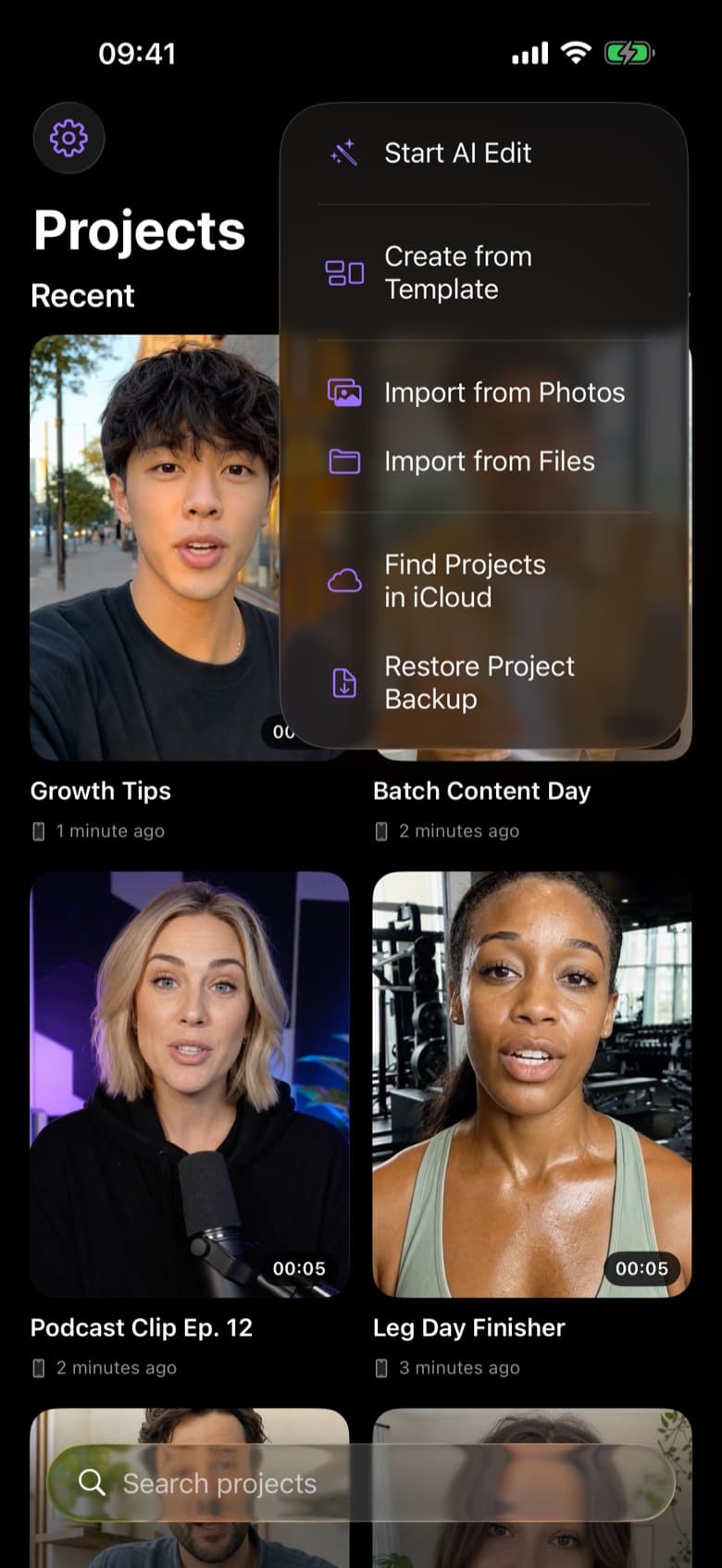
ByeCut new project menu: Start AI Edit, create from template, import from Photos or Files
RAW · 1:12CUT · 0:38 · READY TO POST AI Edit

AI Edit in three steps.

  1. Step 1

    Drop in your raw footage

    Import one long recording or a handful of clips from Photos or Files. Flubbed starts, long pauses and repeated lines are all fine.

  2. Step 2

    Add your script (or don't)

    Paste what you meant to say and AI Edit matches every line to its strongest take. No script? It works out the story from what you said.

  3. Step 3

    Review the cut, then apply

    See RAW next to CUT before anything touches your timeline. Accept it, tweak it, or keep editing by hand.

It listens, instead of just reading a transcript

Most automatic editors transcribe your audio and delete words. That breaks down the moment you record the same line three times: the transcript looks identical, but only one of those takes actually sounds right.

AI Edit, powered by GPT-6, transcribes your footage, plans the story, then compares the competing takes of each line and picks the delivery that lands. Before handing it over, it reviews its own cut. The last take doesn't win by default. The best one does.

What AI Edit removes

Everything a human editor would trim on the first pass:

  • Silences and long pauses between sentences
  • Filler words like “um”, “uh” and “you know”
  • False starts, restarts and “wait, let me say that again”
  • Weaker duplicate takes of the same line

You stay in control

Nothing is applied until you review it. The result lands on a real, multi-track timeline, so you can trim a cut, bring back a line, or add music, text and effects exactly as you would in any pro editor.

AI Edit keeps running in the background. Lock your phone or switch apps, and a Live Activity shows progress on your Lock Screen and in the Dynamic Island.

Built for talking-head creators

AI Edit is designed for speech-driven video: talking-head Reels, TikToks, YouTube Shorts, UGC ads, tutorials, podcast clips and course lessons. If you talk to the camera, it saves you the most time.

Questions, answered.

How long does an AI edit take?

Usually a few minutes, depending on how much footage you import. You can follow each step on screen or on your Lock Screen with a Live Activity.

Does AI Edit upload my video?

No. To pick your best takes, ByeCut sends audio-only copies of your clips, the transcript and any script or notes to OpenAI, its AI provider. OpenAI doesn't train models on it and deletes it within 30 days. Your video files, editing and exports stay on your device.

Can I undo what the AI cut?

Yes. You review the proposed cut before it's applied, and afterwards everything is on a normal timeline you can edit clip by clip.

Is AI Edit free?

Your first AI edit is free on a recording of up to 15 minutes. After that, AI edits come with the Creator (30 a month) and Pro (90 a month) plans, each starting with a 3-day free trial. The manual editor, captions and exports are free forever.

Say bye to editing. Get your evenings back.

Your next video is already sitting in your camera roll. Drop it into ByeCut and get a clean, captioned cut back in minutes. Your first AI edit is free.

Download on the App Store

Free download · No watermark · iPhone & iPad

ByeCut: AI Video EditorEdit in minutes · Free downloadDownload